
Stopfinder
Transfinder CorporationEducation
4.41.20K Reviews
- Version
- 3.1.5
- Installs
- 100.00K
- Age Rating
- Everyone
Screenshots
Our Review of Stopfinder
 Analysis by Appyee
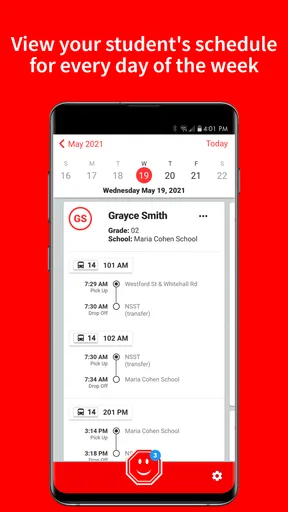
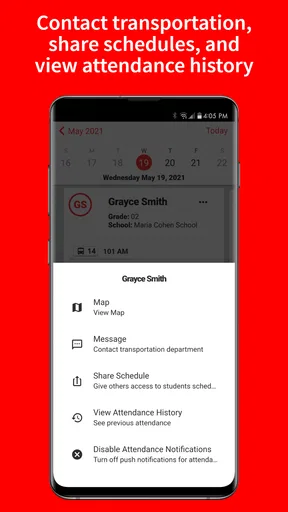
When a school bus is part of your daily routine, the difficult part is often not the ride itself but keeping everyone informed. A child may know the usual stop, a parent may need to check the morning arrangement, and the transportation department may be the right place to contact when something changes. Stopfinder is built around that narrow but important problem. I found it most useful as an education app for families who need a shared view of students’ daily bus stops and a direct way to communicate with the school transportation department.
My first impression was that this is not trying to be a general family organizer, a navigation replacement, or a broad school-information hub. Its value depends on whether a participating school or district uses it and whether the information connected to your account is current. That makes it a practical tool rather than an app I would recommend to everyone. For the right household, though, it can reduce the daily need to search through old messages or ask a child to remember details that adults may need to verify.
The most useful way to think about Stopfinder is as a shared reference point for school transportation, not as a complete family-management system. That distinction matters when deciding who should install it, how many people should use it, and what information should remain inside the household.
How Stopfinder fits a shared household routine
When I think about how Stopfinder fits a shared household routine, I focus on the handoff between adults rather than simply checking a stop. A useful habit is to agree on who confirms the regular plan and who tells the student about any change, so the app supports a clear conversation instead of becoming another source of conflicting assumptions. That household rhythm also makes it easier to decide how setup and access should work.
A realistic morning and afternoon use case
Imagine a household where one adult leaves for work before the student boards the bus, while another adult handles the afternoon pickup. Without a central place to check the student’s bus-stop details, the family may rely on memory, screenshots, group messages, or a paper note on the refrigerator. Those solutions can work until a schedule changes or a different caregiver takes over.
In that situation, I would use Stopfinder as a quick checkpoint rather than something that stays open all day. Before the morning rush, the adult responsible for the student can review the relevant stop information. Later, the person handling the afternoon routine can check the same information instead of depending on a secondhand explanation. That small change is especially helpful when grandparents, babysitters, or separated parents share transportation responsibilities.
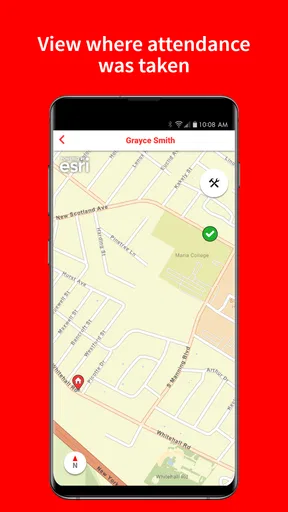
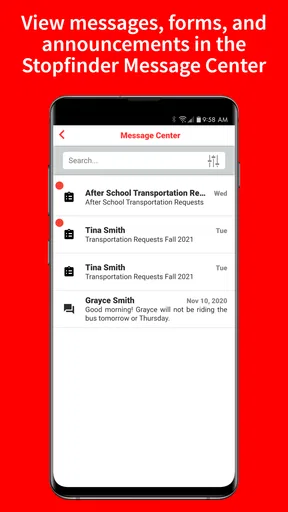
The app’s focus on students’ daily bus stops also gives it a clearer purpose than a normal map application. A map can show roads and locations, but it does not automatically represent the school transportation arrangement a family is trying to follow. Conversely, a family chat can carry updates but becomes difficult to search and easy to misunderstand. Stopfinder sits between those two habits: it gives transportation information a dedicated home and provides a communication path to the transportation department.
I would still keep a backup plan for unusual days. If a student is attending an appointment, being collected by a different adult, or not riding home, the app should not replace the family’s own conversation and planning. A bus-stop reference can tell you the regular arrangement, but household coordination still depends on people confirming who is responsible that day.
Why shared-device use needs a little care
Some families will use Stopfinder on a personal phone, while others may check it from a tablet or another device used by several people. A shared device can be convenient in a kitchen or family room, but it also changes how carefully I would handle the account. I would avoid treating a communal screen as if it belonged to one person, especially when the app displays student transportation information.
My practical approach would be to decide who genuinely needs access before signing in on multiple devices. A parent who regularly manages the bus routine may need frequent access. A caregiver who helps only occasionally may be better served by receiving the necessary information directly from the responsible adult rather than using the account independently. This is not about making the process difficult; it is about keeping account boundaries understandable.
I would also make sure every adult in the household knows which information comes from Stopfinder and which information comes from a separate school message. Mixing several sources can create confusion. If a transportation department communicates through the app, that channel should be treated as the place to check for transportation-related guidance, while schoolwork, attendance, and classroom notices may remain elsewhere.
What the app does not replace inside a family
Stopfinder is not a substitute for teaching a child the basic plan. A student should still know the usual stop, what to do if the expected bus does not appear, and which trusted adult to contact. Younger children may need an adult to interpret the information and turn it into a simple routine. Older students may be able to check the app themselves, but I would not assume that opening an app means they have understood a change.
That is one of the app’s main boundaries. It can support coordination, but it cannot make a household coordinated by itself. I see the best results when adults use it to confirm details, then explain the plan in plain language to the student and any caregiver involved.
Setup, account boundaries, and everyday coordination
For setup and everyday coordination, I would keep the account and communication roles deliberate, especially when a caregiver helps only occasionally. Before relying on the app during a busy morning, I would make one calm check of each student’s details and settle on a simple way to pass along changes. Those choices help clarify the practical boundaries around accounts, shared devices, and routine coordination.
Start with the school connection, not the device count
Before making Stopfinder part of a household routine, I would first establish whether the student’s school transportation arrangement is represented in the app. The developer is Transfinder Corporation, and the app is designed around communication with a transportation department, so its usefulness is tied to the transportation system behind it. Installing it is only the first step; the important question is whether the correct student and bus-stop information appear after the account is connected.
I would approach setup methodically. Use the account intended for the adult who will manage transportation most often, check that the student information is correct, and review the displayed stop details before relying on them. If more than one student belongs to the household, I would look at each student separately rather than assuming that one visible arrangement applies to everyone. Different students can have different schedules or stops, and a hurried glance can lead to a preventable mix-up.
There is also a useful habit here: after setup, compare the app’s information with the family’s current school communication. If the details appear different, I would pause and contact the transportation department instead of guessing which version is right. The communication function is important precisely because transportation questions are better directed to the responsible department than debated among family members.
Keep the account boundary clear
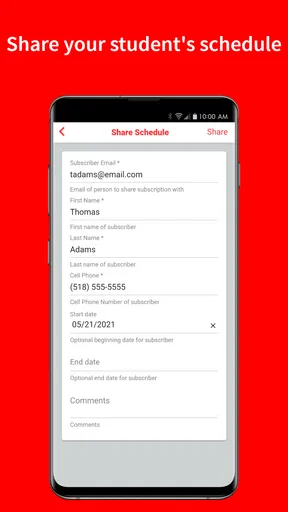
For shared use, I would distinguish between the account owner, regular household users, and occasional helpers. The account owner should be the adult who can keep the information organized and respond when the transportation department needs clarification. Other adults may need access, but access should be intentional rather than passed around casually.
This matters even more when households change from day to day. A child may stay with another parent, a relative may handle a pickup, or a caregiver may cover one afternoon. In those cases, I would share the relevant plan through a direct conversation and confirm who is responsible. I would not assume that every person who can see a device should automatically see the student’s transportation details.
On a shared tablet, I would be especially careful about leaving the app open. The convenience of a family-room device is real, but a locked personal device gives clearer control over who can view the account. Stopfinder is free, which removes a financial barrier for families, but free access does not eliminate the need for sensible account habits.
Use communication as a focused channel
The ability to communicate with the transportation department is more valuable when used for specific, well-organized questions. Instead of sending a vague message such as “Where is the bus?”, I would include the student’s name, the relevant day, and the exact issue in a concise explanation, while avoiding unnecessary personal details. Clear messages are easier for the receiving department to understand and easier for the household to remember later.
I would also avoid using the communication channel as a replacement for urgent action. If a child is waiting alone or there is an immediate safety concern, the adult should follow the school or district’s established emergency process rather than assuming an in-app message will be read instantly. Stopfinder can support normal transportation communication, but it should not be treated as a live emergency service.
A helpful household workflow is to nominate one adult to monitor transportation messages and then pass along only the information others need. That prevents several family members from independently asking the same question and keeps the student’s routine from becoming a tangle of duplicate conversations. It also creates a clear point of responsibility when a change needs to be explained to the child.
Check the information at the right moments
I would not encourage constant checking. The app is more useful when it is tied to predictable moments: before a new school week, when a caregiver arrangement changes, or whenever the transportation department sends a relevant update. Checking at those moments turns the app into a planning tool instead of another source of notification fatigue.
One non-obvious benefit of this approach is that it exposes stale assumptions. Families often remember a stop from the previous term or rely on a screenshot saved months earlier. Opening the current information before a change in routine can reveal that the household has been planning from memory. The app cannot fix an incorrect record, but it can prompt the family to notice that verification is needed.
Version and device expectations
Stopfinder is currently at version 3.1.5 and requires Android 8.0 or later. That makes the operating-system requirement worth checking before handing the setup to an older phone or a household tablet. If the device cannot run the app, the family should decide in advance which supported device will be used by the responsible adult, rather than discovering the problem during a rushed school morning.
The app was released on September 5, 2019, so it is not a brand-new experiment. It has had time to establish a recognizable role in the education category, but I would still judge the experience by how well it works with the current transportation arrangement and the family’s devices. A long presence in an app store does not guarantee that every school’s workflow will feel identical.
Age, trust, and the student’s role
The content rating is Everyone, which makes the app broadly suitable from an age-rating perspective. That does not mean every student should manage the account alone. A younger child may benefit from seeing a simple explanation of the stop without being responsible for account decisions or department communication. An older student may be ready to check the routine independently, but I would still establish what to do if the information looks unusual.
Trust works best when it is gradual. I would let a student participate in checking the plan, then ask them to explain where they should go and who they should contact if something changes. That turns the app from a passive screen into a small lesson in transportation responsibility. The adult remains the final coordinator, while the student learns how to use the information safely.
For families with multiple adults, the same principle applies. Do not confuse technical access with responsibility. The person who can open the app is not automatically the person who should approve a change, contact the department, or decide whether a student should wait at a different location. Keeping those roles clear prevents the app from becoming an accidental substitute for parental judgment.
Where Stopfinder is stronger than familiar alternatives
Compared with a paper schedule, the app is easier to consult when the household is away from home and less likely to disappear under school papers. Compared with a group chat, it gives transportation information a more focused setting and avoids burying the key detail under unrelated messages. Compared with a general map app, it is closer to the school transportation context rather than merely showing geography.
Its communication role is another meaningful difference. A map can help someone find a street, and a chat can reach another adult, but neither is designed around contacting the transportation department about the student’s bus-stop arrangement. That specialized purpose is why I would choose Stopfinder over a general alternative when the school’s transportation workflow supports it.
There are trade-offs. A paper note remains available without a device, and a family group chat may be faster for telling a caregiver about a one-time change. A general school app may be more convenient if a household wants attendance, grades, messages, and transportation in one place. Stopfinder is better when transportation deserves its own clear channel; it is less attractive if the family strongly prefers one consolidated school platform or if the relevant transportation information is not maintained there.
Who should use it and who should skip it
I would recommend Stopfinder to parents and guardians who regularly coordinate bus routines, households with more than one transportation caregiver, and families that want a dedicated route to the transportation department. It is also a sensible option for adults who are tired of relying on old screenshots or asking a student to repeat stop details from memory.
I would be more cautious for someone who rarely uses school transportation, has no need to communicate with the transportation department, or expects a full school-management suite. The app’s focused design is a strength, but it also means it will not replace classroom communication, general family calendars, or emergency contact procedures. If your main need is live navigation for a car journey, a map app is the more appropriate tool.
The public response suggests that the app has found a substantial audience: it has more than 100 thousand installs, with an average rating of 4.4 from around 2.7 thousand ratings and about 1.2 thousand written reviews. I take those figures as a sign that the basic idea is useful to many families, not as a guarantee that every account setup will be smooth. Transportation apps are unusually dependent on local information, so personal usefulness can vary by school and district.
My household verdict
After looking at Stopfinder as a shared household tool, I see it as a practical, narrowly focused education app rather than an essential download for every parent. Its best quality is clarity: it gives bus-stop information and transportation communication a dedicated place, which can make a busy family routine easier to coordinate. The free price also makes it easy to try without adding another subscription decision to the school year.
I would install it when the school transportation department supports the workflow and when more than one adult needs dependable access to the student’s daily stop information. I would set it up on the device of the responsible adult first, verify every student’s details, and then decide carefully who else needs access. I would also explain to the child that the app supports the plan but does not replace listening to trusted adults or following established safety instructions.
My main reservation is not about the idea; it is about dependence. The app cannot make inaccurate or outdated transportation information useful, and a message channel should never be mistaken for instant emergency help. Families should keep a simple offline understanding of the routine and know how to contact the school through its normal procedures when something does not look right.
Overall, Stopfinder earns a place in my recommendations for households that need transportation-specific coordination. It is especially helpful when caregivers share responsibility and ordinary alternatives have become scattered across notes, chats, and memory. If your family wants an all-in-one school platform or does not use school buses, another app may fit better. For the household that wants one focused reference point for student bus stops and a direct transportation conversation, this app is a sensible and approachable choice from Transfinder Corporation.
Verdict
Strengths of Stopfinder
- Quickly shows bus routes, stops, and estimated arrival times
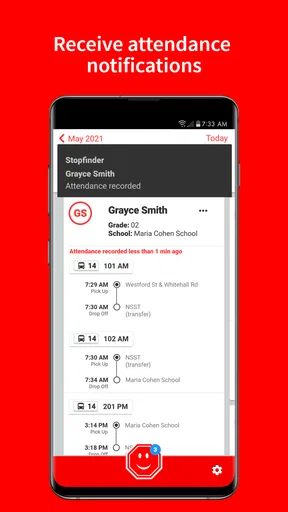
- Helpful alerts keep families informed about delays and schedule changes
- Supports multiple students and routes in one parent account
- Provides stop details without requiring advanced transit knowledge
- Useful for coordinating pickups, drop-offs, and daily school travel
Limitations of Stopfinder
- Availability depends on whether the local school district supports Stopfinder
- Arrival estimates may be inaccurate during traffic or service disruptions
- Some features require account access provided by the school district
- Notifications can be inconsistent if permissions or location settings are limited
- The interface may feel less useful outside supported school transportation areas
Similar Picks in This Category
View All
Duolingo: Language Lessons
Duolingo4.7

Google Classroom
Google LLC2.8

Unacademy: Learn & Crack Exams
Unacademy3.2

Bible App for Kids
Life.Church4.4

Cake - Learn English & Korean
Cake Corp.4.7

Brainly: AI Homework Helper
Brainly4.5
Frequently Asked Questions
What is Stopfinder and what can I use it for?
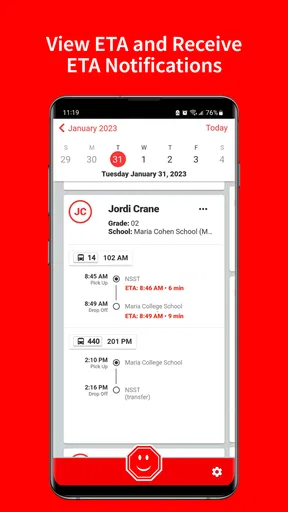
Stopfinder is a school transportation information app designed to help families view details about their child’s bus service. Depending on the school district’s setup, you may be able to see assigned routes, bus stops, pickup and drop-off times, and transportation updates. It is mainly a communication and planning tool, so the information available can vary between districts and may require an invitation or account provided by the school.
How do I log in to Stopfinder?
Access to Stopfinder is usually connected to your school district or transportation provider. After downloading the app, parents or guardians generally sign in with credentials supplied by the school, or create an account using an invitation or registration code. If your child’s transportation details do not appear, check that you used the correct email address and contact the school district rather than creating multiple accounts.
Can Stopfinder track my child’s school bus in real time?
Stopfinder may provide bus location, estimated arrival information, or transportation notifications when these features are enabled by the school district and supported by its bus fleet. Real-time tracking is not guaranteed for every route, and GPS data can sometimes be delayed or unavailable because of poor connectivity, technical issues, or schedule changes. Always use the displayed information alongside the official instructions from your school.
Does Stopfinder send alerts about delays, cancellations, or route changes?
The app can be used by participating schools and transportation departments to send notifications about delays, cancellations, altered stops, and other service announcements. However, the alerts you receive depend on how actively your district uses the platform and which notification settings are enabled on your device. After installation, allow relevant notifications and regularly check the app for updates, especially during severe weather or unusual schedules.
Is Stopfinder free, and is it safe to use?
Stopfinder is generally offered to families at no direct cost when their school district provides access, although availability and account requirements can differ. Because the app may display student transportation information, you should use the official app listing, protect your login details, and avoid sharing screenshots containing route or stop information publicly. Review the app’s privacy policy and your district’s guidance to understand how personal data is handled.
